


















Commercial Microwave Oven error codes
Most error codes shown on a Commercial Microwave Oven are part of the unit’s built-in self-diagnostic system and indicate a possible malfunction. In these cases, the microwave may need to be inspected and serviced by an Authorized Panasonic Service Centre.
Some messages, however, may be resolved by following the recommended troubleshooting or operating steps outlined in the user manual. If the message remains after troubleshooting, we recommend contacting Panasonic support for further assistance.
For Model NE-3280
- To ensure safe operation and proper ventilation, adequate clearance must be maintained around the Panasonic Commercial Microwave Oven NE-3280 at all times.
- Leave sufficient space around the microwave so air can circulate freely.
- Do not block or cover any ventilation openings.
- Avoid placing the unit directly against walls, other equipment, or inside enclosed cabinetry.
- Keep the top and sides of the microwave clear of objects and obstructions.
- Maintaining proper clearance helps prevent overheating, ensures optimal performance, and extends the life of the microwave. Failure to provide adequate ventilation may result in operational issues or damage to the unit.
- If you are unsure whether your installation meets these requirements, please submit a support form and our service team will be happy to assist.
- Locate the oven on a smooth, flat and stable surface. There should be no gap between the table surface and the bottom of the oven. Do not place the oven in a hot or damp area, ie. near a stove, sink or directly above heat lamps on a serving line. Free airflow around the oven is important.
If error continues;
contact Panasonic Commercial Support by submitting a Service Request Form.
- For model NE-3280 if your Panasonic Commercial Microwave Oven NE-3280 is not functioning as expected, tap the STOP pad on the control panel and switch Voltage to 208.
- To switch Voltage:
- Unplug the microwave oven from the power source.
- On the back of the oven, unscrew the voltage adjustment cover.
Note: Do not remove any other parts from the oven. - Remove the connector from the white socket, rotate it 180 degrees, and plug it into the black socket.
- Reattach the voltage adjustment cover securely to the cabinet.
- Verify the voltage setting:
- For 208V, the connector must be plugged into the white socket.
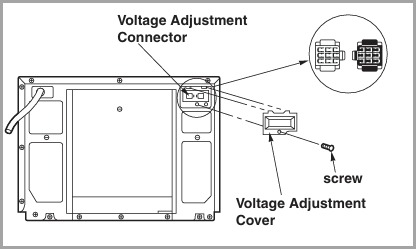
- For 208V, the connector must be plugged into the white socket.
- Caution: Always ensure the power cord is unplugged before removing or reinstalling the voltage adjustment cover.
- If the issue is not resolved after checking the voltage and resetting the unit, please Contact Panasonic Commercial Support by submitting a Service Request Form.
- For model NE-3280 if your Panasonic Commercial Microwave Oven NE-3280 is not functioning as expected, tap the STOP pad on the control panel and switch Voltage to 240.
- To switch Voltage:
- Unplug the microwave oven from the power source.
- On the back of the oven, unscrew the voltage adjustment cover.
Note: Do not remove any other parts from the oven. - Remove the connector from the white socket, rotate it 180 degrees, and plug it into the black socket.
- Reattach the voltage adjustment cover securely to the cabinet.
- Verify the voltage setting:
- For 220–240V, the connector must be plugged into the black socket.
- For 220–240V, the connector must be plugged into the black socket.
- Caution: Always ensure the power cord is unplugged before removing or reinstalling the voltage adjustment cover.
- If the issue is not resolved after checking the voltage and resetting the unit, please Contact Panasonic Commercial Support by submitting a Service Request Form.
Contact Panasonic Commercial Support by submitting a Service Request Form.
High Speed Oven
- This issue may occur if the microwave oven is connected to a 50 Hz power supply. Panasonic commercial microwave ovens are designed to operate on a 60 Hz power supply.
- Please verify that the oven is connected to a 60 Hz electrical supply.
- If the issue continues after confirming the correct power frequency, please Contact Panasonic Commercial Support by submitting a Service Request Form.
For model NE-21521, NE-17521 and NE-12521 Contact Panasonic Commercial Support by submitting a Service Request Form.
- Related to overheating or insufficient air gap.
- Ensure there is proper clearance around the unit. If the room temperature is too high or airflow is restricted, this error may appear.
-
If the issue is not resolved after improving ventilation and clearance,
Contact Panasonic Commercial Support by submitting a Service Request Form.
Contact Panasonic Commercial Support by submitting a Service Request Form.
For model NE-21521, NE-17521 and NE-12521 contact Panasonic Commercial Support by submitting a Service Request Form.
For model NE-21521, NE-17521 and NE-12521 contact Panasonic Commercial Support by submitting a Service Request Form.
For NE-3280
For NE-3280
For model NE-21521, NE-17521, NE-12521, NE-3280 contact Panasonic Commercial Support by submitting a Service Request Form.
For model NE-21521, NE-17521, NE-12521, NE-3280 contact Panasonic Commercial Support by submitting a Service Request Form.
For NE-3280 contact Panasonic Commercial Support by submitting a Service Request Form.
For NE-3280 contact Panasonic Commercial Support by submitting a Service Request Form.
High Speed Oven
This error occurs when the SD memory card's write protection switch is set to "Lock."
- Remove the SD memory card from the device.
- Locate the small **sliding switch** on the left side of the SD card (when the label is facing up).
- If the switch is in the **"Lock"** position (towards the bottom), slide it **upward** to the **"Unlock"** position.
- Reinsert the SD card into your Commercial Microwave Oven.
- Power the device back on and check if the error is resolved.
- If the error persists: verify if the switch feels loose or broken, the card may be damaged and should be replaced.
High Speed Oven
- The “U17” error indicates that an unsupported memory card has been inserted into the device.
- Remove the current SD memory card from your camera.
- Insert the specified SD memory card that was shipped from the factory with the main unit into the SD card slot in your product Operating Manual NN-SCV2.
- Please refer to the operating manual for details on compatible SD memory card types and formats.
- If the “U17” error appears again after using a compatible SD card, the SD card may be damaged.
- If this issue continues to occur even after inserting the correct SD card, please
High Speed Oven
- Insert the specified SD memory card that was shipped from the factory with the main unit into the SD card slot.
- When saving or deleting a cooking process, or when cooking according to a saved program, be sure to set up and use the specified SD Memory Card .
- If a card other than the specified SD Memory Card shipped out with the unit is set up, “U17” will appear on the Commercial Microwave Oven. Refer to NE-SCV2N Operating Manual (Page 48).
- You can also save a cooking program data onto the specified SD Memory Card using your personal computer. NE-SCV2N Operating Manual (Page 51-52).
- Ensure the card is fully inserted and properly oriented. Refer to page 50 of the operating manual for detailed instructions NE-SCV2N Operating Manual (Page 50)
- Check the display again after inserting the SD card to confirm the message is cleared.
- If the issue persists even after inserting the original specified SD memory card shipped out with the main unit, please .
| Code | Problem | What to do |
|---|---|---|
| U30 | Memory cooking has exceeded the maximum time during Double Quantity and Triple Quantity Settings | Check and change the time.
|
 Note:The maximum set time for "DEFROST" and "P0" is 30 minutes, and 15 minutes for all others.
 Contact Panasonic Commercial Support by submitting a Service Request Form.
High Speed Oven
- This error can occur if the touch screen is pressed for 25 seconds or longer.
- Make sure the touch screen is not being touched or pressed for an extended period of time.
- Check the screen for dirt, grease, moisture, or debris, and gently clean it with a soft, dry cloth.
- If the error continues after cleaning and normal use, please .