








How to Connect by pairing your earphones with Bluetooth
Connecting to a Bluetooth® device Preparation
- Put the earphones into the charging cradle.
- Place the Bluetooth® device within approx. 1 m (3.3 ft) from the unit.
- Check the device operation using its operation instructions as required.
Connecting by pairing (registering) your earphones with a Bluetooth® device for the first time
Important:
- Depending on the connected Bluetooth® device, a loud sound may be output during playback.
Check the volume setting of the Bluetooth® device before starting playback.
- Put both earphones (L and R) into the charging cradle and charge.
- Take both earphones (L and R) out of the charging cradle and wear them.
- The earphones will automatically go into pairing mode by announcing “Pairing”.
- Turn on the Bluetooth® device and enable the Bluetooth® function.
- From the Bluetooth® menu of the Bluetooth® device, select device name “Panasonic RB-F10”.
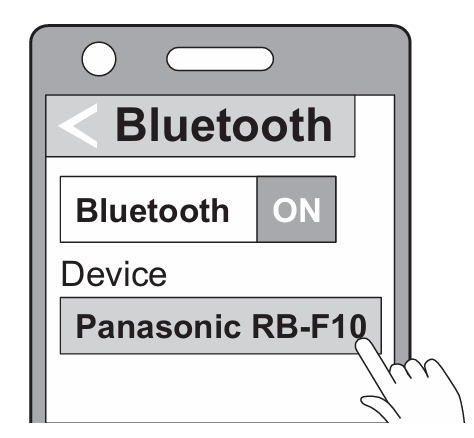
- Confirm that the earphones and the Bluetooth® device are connected.
How to pair additional devices You can pair a maximum of 10 Bluetooth® devices.
- To pair the 2nd and subsequent devices
- Put both earphones (L and R) into the charging cradle and charge.
- Take both earphones (L and R) out of the charging cradle and wear them.
- Touch and hold both touch sensors (L and R) for about 5 seconds.
- DO NOT UNPAIR from the device’s Bluetooth® settings.
- The earphones will automatically disconnect from paired devices and go into pairing mode by announcing “Disconnected” and then “Pairing”.
- Turn on the Bluetooth® device and enable the Bluetooth® function on the next device you want to pair.
- From the Bluetooth® menu of the Bluetooth® device, select device name “Panasonic RB-F10”.
- Confirm that the earphones and the Bluetooth® device are connected.
- To establish the multi-point connection
This unit can connect up to 2 Bluetooth® devices at the same time.
- To use this feature, continue from step 6, “To pair the 2nd and subsequent devices”.
- Reconnect from the first Bluetooth® device.
Note:
- This unit remembers the device lastly connected. The unit may connect automatically after turning on the power of this unit.
- The unit will automatically turn off if it is in pairing mode and not connected to a device for 5 minutes. To turn it back on, refer to “Turning the earphones on and off” and then do pairing again in “How to pair additional devices”
- When you pair a device after the maximum has been exceeded, previous devices are overwritten. To use overwritten devices again, do the pairing again.
- For information about using the Bluetooth® devices, please refer to the manuals of the Bluetooth® devices.