












How to select the video input source.
- Press [ Input ].
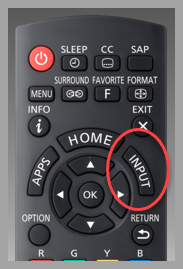 button location may vary
 - Press [▼] or [▲] to select the input your external device is connected to. (Antenna/Cable In,HDMI1, HDMI2, HDMI3, AV)
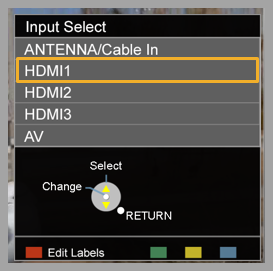 Image varies by model
Refer to your models Operating Manual for more information.
Image varies by model
Refer to your models Operating Manual for more information.
- Once highlighted press [ OK ]
The display images do vary by models. These instructions apply to model series AS500, AS530, AS540, AS560, AS630, AS660, AS680, AS800, AX800, AX900, C400, CS540, CS560, CX420, CX600, CX650, CX800, CX850, D400, DS600, DS630, DX650, DX700, DX800, DX900, ES600, X600,EX601, EZ950, EZ1000, FX600, FX700,FX800, FZ1000, FZ950, GT30, GX700, GX800, S30.