











How to turn off the "Auto Off" feature.
Technics models are designed to conserve power consumption and save energy. When a unit has been left unused for approx. 20 minutes it will enter standby mode. This feature can be turned OFF. To learn how to turn off the feature choose the Technics model from the provided list.
If your model is not mentioned, consult the Operating Manual of your specific model "Auto OFF" programming.
Model SA-C100
To turn this feature OFF.
- Press [ SETUP ].
- Press the arrow up ▲ or down ▼ button repeatedly to select " AUTO OFF ".
- Press [ OK ].
- Press the arrow up ▲ or down ▼ button to select " OFF ".
- Press [ OK ].
Note:
- When the input source is "FM", this function does not work.
- The factory default is "Off".
- The setting is stored even if the power is turned off and on.
- "Auto Off" is displayed 3 minutes before this unit is turned off.
Model SA-C600
Models SC-C30, SC-C50
To turn this feature OFF.
- Press the Input/Source
 button, etc. to cancel it.
 - The auto off function can be changed with the dedicated application “Technics Audio Center” Download for free at the Technics Global website .
Model SC-C500
To turn this feature OFF.
- Press [ SETUP ].
- Press the arrow up ▲ or down ▼ button repeatedly to select " AUTO OFF ".
- Press [ OK ].
- Press the arrow up ▲ or down ▼ button to select " OFF ".
- Press [ OK ].
Model SC-C65
To turn this feature OFF.
- Press [ SETUP ].
- Press the arrow up ▲ or down ▼ button repeatedly to select " AUTO OFF ".
- Press [ OK ].
- Press the arrow up ▲, down ▼ or Left [◄], [►] button to select " OFF ".
- Press [ OK ].
Models SC-C70, SC-C70MK2
Model SC-CX700
-
Setting the limitation of volume (“VOL Limitation”)
- Purpose: Set an upper limit on the output to avoid extremely high volume when turning on the unit or during playback.
- How to set: Press and hold [MUTE] on the remote control for 4 seconds to toggle “On” or “Off”.
-
LED indicator status (lights for 2 seconds):
- On: USB/AUX/PHONO
- Off: NET/ /OPT
- Factory default: Off.
- Alternative method: Can also be set using the Technics Audio Center app.
-
Auto off function (“Auto Off”)
- What it does (when set to “On”): Automatically enters standby to save energy if there is no sound output and no operation (e.g., pressing buttons) for approximately 20 minutes.
- Exception: Does not work when DSD audio plays back in “USB”.
-
How to set:
- Set the volume of this unit to the minimum.
- While pressing and holding the [-] of [-VOL+] on the unit, press [ ] to set to “On” or “Off”.
-
LED indicator status (lights for 2 seconds):
- On: USB/AUX/PHONO
- Off: NET/ /OPT
- Alternative method: Can also be set using the Technics Audio Center app.
-
Notes:
- The setting is stored even if the power is turned off and on.
- The power indicator softly flickers to notify 3 minutes before the power turns off.
Model SE-R1
- To cancel this function, set to [OFF] the [AUTO OFF] switch which is located on the rear panel.
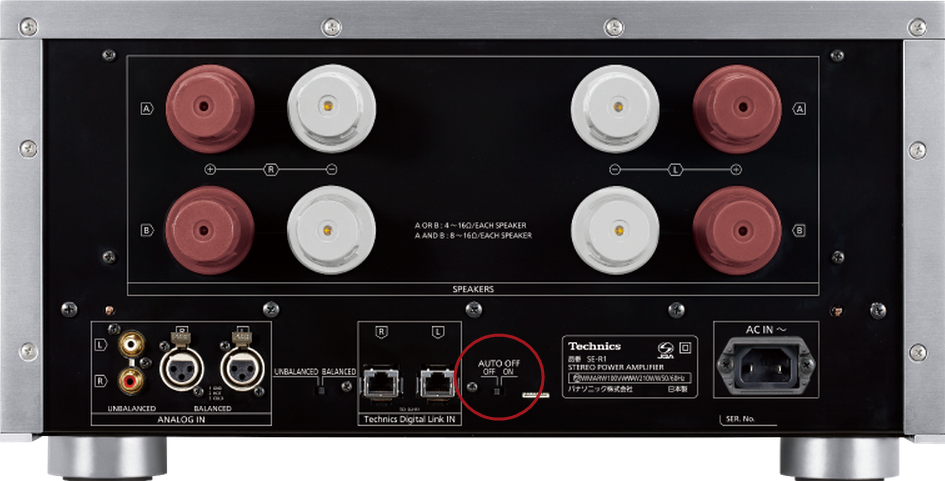
- If the SU-R1 Network controller is connected to this unit via the system control function, this unit may automatically enter standby mode when the SU-R1 enters standby mode.
Model SL-C700
To turn this feature OFF.
- Touch [ MENU ] repeatedly to select " Setup "" and then touch Play/Pause
 .
. - Touch [ MENU ] repeatedly to select " AUTO OFF ".
- Touch the Skip forward or Skip back
 buttons to select [ OFF ], and then touch Play/Pause .
 - Touch the Stop ■ button twice to complete the programming.
Models SL-G700, SL-G700M2
To turn this feature OFF.
- Press [ NWP ].
- Press [ SETUP ].
- Press the arrow up ▲ or down ▼ button repeatedly to select " AUTO OFF ".
- Press [ OK ].
- Press the arrow up ▲ or down ▼ button to select " OFF ".
- Press [ OK ].
Model ST-C700
To turn this feature OFF.
- Press [ NWP ].
- Press [ HOME ].
- Press the arrow up ▲ or down ▼ button repeatedly to select " SETUP ".
- Press [ OK ].
- Press the arrow up ▲ or down ▼ button repeatedly to select " AUTO OFF ".
- Press [ OK ].
- Press the arrow up ▲ or down ▼ button to select " OFF ".
- Press [ OK ].
Model SU-C700
To turn this feature OFF.
- Press and hold [ MUTE ] until the PHONO indicator on this unit starts to blink.
- Press [ MUTE ]. Each time you press the button.
- COAX3 indicator blinks : On
- OPT indicator blinks : Off
- Press [ VOL Down - ] to exit.
If the ST-C700 is connected to this unit via the system control function, this unit may automatically enter standby mode when the ST-C700 enters standby mode.
Model SU-G30
Model SU-G700, SU-G700M2
To turn this feature OFF.
- Press [ AMP ].
- Press [ SETUP ].
- Press the arrow up ▲ or down ▼ button repeatedly to select " AUTO OFF ".
- Press [ OK ].
- Press the arrow up ▲ or down ▼ button to select " OFF ".
- Press [ OK ].